修复 h5player 脚本在巴哈姆特持续注入 CSS
很喜欢 h5player 的截图功能,喜欢到了刚需的程度!它强大到自己可以让网页上的一切视频都能截图,甚至做到下载。虽然它如今已经适配 37+ 网站,但它还是不对付我常用的两个看番网站:
- https://ani.gamer.com.tw/
- https://anime1.me
这个问题我 22 年左右就发现了,一直没有提 ISSUE,也没有下载下来自己定位看看,时至如今,这个问题依旧,终于在这周看无职转生的时候,因为忍受不了,决定着手看看能不能 patch 一个版本自己先用着。
问题定位
因为几乎没有大型脚本开发经验,是个纯新手、菜鸟,所以毫不忌讳地说,全程几乎是用 LLM 帮我去探索的。而且很有意思的是,因为脚本需要模拟浏览器注入的行为,所以所有操作只能通过 CLI 环境实现,所以发现了很多有意思的东西:
Chrome DevTools Protocol (CDP)
他和浏览器交互使用的协议就是 F12 开发工具与后端交互的那套 —— JSON-RPC 2.0,本质来说,让 Agent 运行无头模式后:
Google Chrome --headless=new --remote-debugging-port=9222
就能通过请求 9222 端口拿到结构化的数据,通过一个本地的 JS 客户端,可以进行本地调试:
/**
 * CDP 最小客户端:通过 Chrome DevTools Protocol 驱动无头 Chrome
 *
 * 使用前提:以如下方式启动 Chrome(暴露出调试端点)
 *   Google Chrome --headless=new --remote-debugging-port=9222 --user-data-dir=/tmp/profile
 *
 * 用法示例(配合本文件导出的 newTab / eval / waitFor):
 *   const { newTab, waitFor } = require('./cdp')
 *   const cdp = await newTab('https://example.com')   // 打开页面
 *   await waitFor(cdp, `document.querySelector('video') !== null`)  // 等待页面条件
 *   await cdp.eval(`1 + 1`)                           // 在页面里执行 JS
 *
 * 为什么需要它:排查"时序竞态"类 bug(如本仓库 tips 样式残留问题)时,
 * 静态读代码无法复现问题,需要真实驱动浏览器、注入真实脚本、观察运行时 DOM/CSS。
 * CDP 是公开协议(DevTools 自身就在用),Node 22 内置 WebSocket 客户端,
 * 因此无需 puppeteer/playwright 等重依赖,手写这个小客户端即可。
 */
const http = require('http')

/** HTTP GET 请求辅助(如拉取 http://127.0.0.1:9222/json 获取标签页列表) */
function getJSON (url) {
  return new Promise((resolve, reject) => {
    http.get(url, (res) => {
      let data = ''
      res.on('data', (c) => { data += c })
      res.on('end', () => resolve(JSON.parse(data)))
    }).on('error', reject)
  })
}

let id = 0

/**
 * CDP 会话封装:通过 WebSocket 与浏览器通信
 * 协议是 JSON-RPC 风格:发送 { id, method, params },浏览器回 { id, result/error };
 * 没有 id 的消息是浏览器主动推送的事件(如 console 日志),统一收集到 this.events
 */
class CDP {
  constructor (ws) {
    this.ws = ws
    this.pending = new Map() // 记录"已发送但未返回"的命令,靠 id 对应响应
    this.events = [] // 收集浏览器主动推送的事件(异常、console 输出等)
    ws.onmessage = (ev) => {
      const msg = JSON.parse(ev.data)
      if (msg.id && this.pending.has(msg.id)) {
        // 有 id 且匹配到待处理命令 → 兑现对应 Promise
        const { resolve, reject } = this.pending.get(msg.id)
        this.pending.delete(msg.id)
        msg.error ? reject(new Error(JSON.stringify(msg.error))) : resolve(msg.result)
      } else if (msg.method) {
        this.events.push(msg)
      }
    }
  }

  /** 发送一条 CDP 命令(method 如 'Runtime.evaluate'、'Page.navigate'),返回其 result */
  send (method, params = {}) {
    const msgId = ++id
    return new Promise((resolve, reject) => {
      this.pending.set(msgId, { resolve, reject })
      this.ws.send(JSON.stringify({ id: msgId, method, params }))
    })
  }

  /** 在页面上下文里执行一段 JS 表达式并取回结果(awaitPromise 支持返回 Promise 的表达式) */
  async eval (expression, awaitPromise = true) {
    const r = await this.send('Runtime.evaluate', { expression, awaitPromise, returnByValue: true })
    if (r.exceptionDetails) throw new Error('eval exception: ' + JSON.stringify(r.exceptionDetails))
    return r.result.value
  }
}

/**
 * 创建一个新标签页并建立 CDP 会话
 * 注:新版 Chrome 的 /json/new 只接受 PUT 方法(GET 会返回 400),
 * 需要创建空白页时传空 url
 */
async function newTab (url) {
  const opts = url ? { method: 'PUT' } : { method: 'PUT', body: '' }
  const raw = await new Promise((resolve, reject) => {
    const req = http.request('http://127.0.0.1:9222/json/new', opts, (res) => {
      let data = ''
      res.on('data', (c) => { data += c })
      res.on('end', () => resolve(data))
    })
    req.on('error', reject)
    if (url) {
      req.write(url)
    } else {
      req.write('about:blank')
    }
    req.end()
  })
  const tab = JSON.parse(raw)
  const ws = new WebSocket(tab.webSocketDebuggerUrl)
  await new Promise((resolve, reject) => { ws.onopen = resolve; ws.onerror = reject })
  const cdp = new CDP(ws)
  await cdp.send('Runtime.enable')
  await cdp.send('Page.enable')
  return cdp
}

/** 轮询等待页面满足某个条件(如某元素出现),超时则抛错 */
async function waitFor (cdp, expression, timeout = 30000) {
  const start = Date.now()
  while (Date.now() - start < timeout) {
    try {
      if (await cdp.eval(expression)) return true
    } catch (e) {}
    await new Promise((r) => setTimeout(r, 300))
  }
  throw new Error('waitFor timeout: ' + expression)
}

module.exports = { CDP, newTab, waitFor }
然后就可以通过外部调用把我们的 JS 脚本送进去:
// 客户端做的事:把 dist 源码作为字符串塞给页面
await cdp.eval(`(() => {
  const s = document.createElement('script')
  s.textContent = ${JSON.stringify(us)}   // us = dist/h5player.user.js 的源码文本
  document.body.appendChild(s)            // 页面浏览器解析并执行它
  return true
})()`)
WebDriver BiDi
类似的,因为 Firefox 彻底不支持了 CDP,两者主要有如下区别:
| Chrome CDP | Firefox WebDriver BiDi | |
|---|---|---|
| 出身 | 专有协议 | W3C 标准(2024 正式化),跨浏览器通用 |
| 建会话 | HTTP PUT /json/new 建标签页 → 每个标签页一个 WebSocket 端点 |
直接连 ws://host:port/session → 发 session.new 命令 |
| 命令风格 | Runtime.evaluate、Page.navigate、Input.dispatchKeyEvent |
script.evaluate、browsingContext.navigate、input.performActions |
| 事件订阅 | 连接后自动收到(无订阅机制) | 需先 session.subscribe 显式订阅 |
| 能力范围 | 极全:网络拦截、性能剖析、模拟等 | 聚焦 WebDriver 需求:导航、脚本、输入、日志 |
协议本质相同——都是 JSON-RPC over WebSocket:发 {id, method, params},收 {id, result}。所以需要根据 Bidi 再次手搓一个脚本,跟上个版本只有 “ 建会话 “ 和 “ 方法名 “ 不同:
/**
 * WebDriver BiDi 最小客户端:驱动 Firefox(与 debug/cdp.js 的 Chrome CDP 版对应)
 *
 * 使用前提:以如下方式启动 Firefox(暴露 BiDi 端点)
 *   "Firefox Developer Edition.app/Contents/MacOS/firefox" \
 *     --headless --remote-debugging-port=9223 --profile /tmp/ff-profile
 *
 * 用法示例:
 *   const { connect } = require('./bidi2')
 *   const bidi = await connect()                          // 建会话
 *   await bidi.navigate('https://example.com')            // 打开页面
 *   await bidi.eval(`document.title`)                     // 在页面里执行 JS
 *
 * 为什么需要它:Firefox 已移除 CDP,只支持 W3C 标准的 WebDriver BiDi。
 * 协议同样是 JSON-RPC over WebSocket(与 CDP 同构),
 * 但建会话方式、命令命名(script.evaluate / browsingContext.navigate /
 * input.performActions)与 CDP 不同,故单独写一个客户端。
 */
const http = require('http')

let id = 0

/**
 * BiDi 会话封装:通过 WebSocket 与 Firefox 通信
 * 与 CDP 版相同的模式:发 { id, method, params },收 { id, result/error },
 * 用 pending Map 把命令 id 与 Promise 对应起来
 */
class BiDi {
  constructor (ws) {
    this.ws = ws
    this.pending = new Map()
    ws.onmessage = (ev) => {
      const msg = JSON.parse(ev.data)
      if (msg.id && this.pending.has(msg.id)) {
        const { resolve, reject } = this.pending.get(msg.id)
        this.pending.delete(msg.id)
        msg.error ? reject(new Error(JSON.stringify(msg.error))) : resolve(msg.result)
      }
    }
  }

  /** 发送一条 BiDi 命令(如 'script.evaluate'、'session.new'),返回其 result */
  send (method, params = {}) {
    const msgId = ++id
    return new Promise((resolve, reject) => {
      this.pending.set(msgId, { resolve, reject })
      this.ws.send(JSON.stringify({ id: msgId, method, params }))
    })
  }

  /** 在页面上下文执行 JS 并取回结果(target.context 必须是建会话时拿到的顶层 context id) */
  async eval (expression) {
    const r = await this.send('script.evaluate', {
      expression,
      target: { context: this.context },
      awaitPromise: true,
      returnByValue: true
    })
    const res = r.result
    if (res && res.type === 'exception') {
      throw new Error('eval exception: ' + JSON.stringify(res.exceptionDetails))
    }
    return res && res.type === 'undefined' ? undefined : res.value
  }

  /** 页面导航(等价于 CDP 的 Page.navigate) */
  async navigate (url) {
    await this.send('browsingContext.navigate', { context: this.context, url })
  }

  /**
   * 注册文档加载前预执行脚本(等价于 Chrome 的 Page.addScriptToEvaluateOnNewDocument)
   * 注意:排查 h5player 时实测注入的 GM_* stub 在 eval 里读不到(realm 隔离/时序问题),
   * 最终方案是导航完成后直接用 eval 注入 stub,此方法保留备用
   */
  async addPreloadScript (functionDeclaration) {
    const r = await this.send('script.addPreloadScript', { functionDeclaration })
    return r.script
  }

  /**
   * 发送按键(等价于 CDP 的 Input.dispatchKeyEvent)
   * 注意:value 须用 WebDriver 标准按键码(如 Enter = '\uE007'),
   * 直接传 'Enter' 字符串会报 "invalid argument"
   */
  async keyPress (keyValue) {
    await this.send('input.performActions', {
      context: this.context,
      actions: [
        { type: 'key', id: 'kb1', actions: [{ type: 'keyDown', value: keyValue }, { type: 'keyUp', value: keyValue }] }
      ]
    })
  }
}

/**
 * 建立 BiDi 会话
 * 与 Chrome 不同:Firefox 不提供 HTTP 建会话端点(POST /session 会返回
 * "The handshake request must use GET method"),必须直接连接
 * ws://host:port/session,然后在 WebSocket 上发送 session.new 命令完成握手
 */
async function connect (port = 9223) {
  const ws = new WebSocket(`ws://127.0.0.1:${port}/session`)
  await new Promise((resolve, reject) => { ws.onopen = resolve; ws.onerror = () => reject(new Error('ws error')) })
  const bidi = new BiDi(ws)
  const session = await bidi.send('session.new', {
    capabilities: { alwaysMatch: { webSocketUrl: true, acceptInsecureCerts: true } }
  })
  const contexts = await bidi.send('browsingContext.getTree')
  bidi.context = contexts.contexts[0].context
  return bidi
}

module.exports = { BiDi, connect }
巴哈姆特 CSS 问题
最开始也没找到原因,但是根据视频高度不变的现象
初步我们可以锁定,出问题的其实是页面后来注入的三个属性:
min-width: 952.8515625px;
min-height: 535.9765625px;
position: relative;
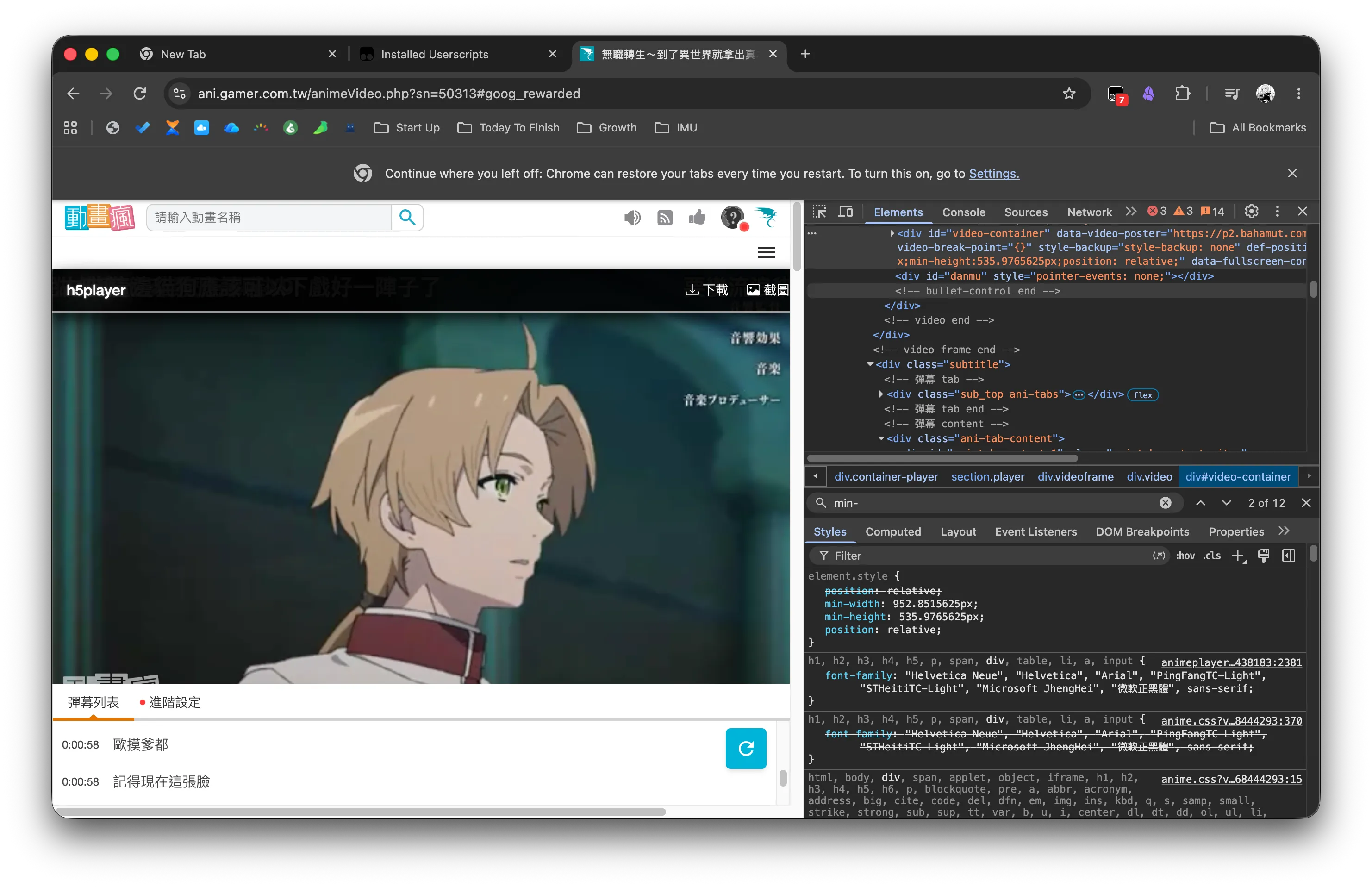
问题找到了,代码改起来就有方向了,那么这个东西是怎么引入的?
前两个其实光看名字就知道影响不大,因为他们定义的是最小宽高,代码源于:
//https://github.com/bgzo/h5player/blob/0571852e296fbd5f1258943508edf16d7e1ea708/src/h5player/h5player.js#L1634-L1640
const playerBox = player.getBoundingClientRect()
const parentNodeBox = parentNode.getBoundingClientRect()
/* 不存在高宽时,给包裹节点一个最小高宽,才能保证提示能正常显示 */
if (!parentNodeBox.width || !parentNodeBox.height) {
	newStyleArr.push('min-width:' + playerBox.width + 'px')
	newStyleArr.push('min-height:' + playerBox.height + 'px')
}
如果播放器周围不存在宽高,那就直接加入当前视频的宽高作为基准即可,直接注入这两个样式不会生效,最致命的就是:
position: relative;
就在上面代码的前几行:
// https://github.com/bgzo/h5player/blob/0571852e296fbd5f1258943508edf16d7e1ea708/src/h5player/h5player.js#L1626-L1632
const oldPosition = parentNode.getAttribute('def-position') || window.getComputedStyle(parentNode).position
if (parentNode.getAttribute('def-position') === null) {
	parentNode.setAttribute('def-position', oldPosition || '')
}
if (['static', 'inherit', 'initial', 'unset', ''].includes(oldPosition)) {
	newStyleArr.push('position: relative')
}
这里其实我们可以看到它备份了旧位置 oldPosition 到 def-position,当旧位置不存在定位上下文的时候,强制赋值为 relative 属性。
为什么这里判断这么多值?
这些值都有一个共同点:它们都不会让元素成为一个“定位祖先”(即不会建立新的定位上下文)。在 CSS 中,只有 relative、absolute、fixed、sticky 才会让元素成为子元素 position: absolute 的参照容器。
static:默认值,元素在正常文档流中,top/right/bottom/left无效,不建立定位上下文。inherit:继承父元素的position值。如果父元素也是static,最终结果还是static,同样无定位上下文。initial:重置为规范初始值,即static。unset:如果是继承属性则继承,否则初始值;对position而言,最终也是static(因为position是非继承属性,所以unset等价于initial→static)。''(空字符串):可能来自解析异常、未传入值或用户配置缺失,通常会当成未设置,也默认当作static处理。
所以,只要 oldPosition 是这五种情况之一,就说明当前元素并没有建立定位上下文。
而这段代码的目的,就是人为地知道一个定位上下文,好让后面追加的左上角元素正常显示,能相对于这个父元素定位。
那为什么这个元素之后没有移除掉呢?如果触发多次 Tips,你其实可以观察到 position: relative; 属性被注入了好几次;我们定位到 Tips 条显示代码:
// https://github.com/bgzo/h5player/blob/0571852e296fbd5f1258943508edf16d7e1ea708/src/h5player/h5player.js#L1680-L1693
function showTips () {
  style.display = 'block'
  t.on_off[0] = setTimeout(function () {
	style.opacity = 1
  }, 50)
  t.on_off[1] = setTimeout(function () {
	// 隐藏提示框和还原样式
	style.opacity = 0
	style.display = 'none'
	if (backupStyle) {
	  parentNode.setAttribute('style', backupStyle)
	}
  }, 2000)
}
可以发现,只有一种情况,会跳过赋值,那就是 backupStyle 为空的时候,那么 backupStyle 的赋值呢?
// https://github.com/bgzo/h5player/blob/0571852e296fbd5f1258943508edf16d7e1ea708/src/h5player/h5player.js#L1592-L1621
let backupStyle = ''
if (!isAudio) {
  // 修复部分提示按钮位置异常问题
  const defStyle = parentNode.getAttribute('style') || ''

  backupStyle = parentNode.getAttribute('style-backup') || ''
  if (!backupStyle) { // 为空备份
	let backupSty = defStyle || 'style-backup: none'
	const backupStyObj = inlineStyleToObj(backupSty)

	/**
	 * 修复因为缓存时机获取到错误样式的问题
	 * 例如在:https://www.xuetangx.com/
	 */
	if (backupStyObj.opacity === '0') {
	  backupStyObj.opacity = '1'
	}
	if (backupStyObj.visibility === 'hidden') {
	  backupStyObj.visibility = 'visible'
	}

	backupSty = objToInlineStyle(backupStyObj)

	parentNode.setAttribute('style-backup', backupSty)
	backupStyle = defStyle
  } else {
	/* 如果defStyle被外部修改了,则需要更新备份样式 */
	if (defStyle && !defStyle.includes('style-backup')) {
	  backupStyle = defStyle
	}
  }
  // .....
这里其实可以看到两个问题:
- 如果 defStyle 本来就是空的,那就备份也一直都是空的,那么下面的样式就永远无法还原(本次情况)
- 如果 backupStyle 在后续操作中已经有有有值了,但是这里赋值的时候没有排除我们之前强制注入的定位属性 relative
最终的现象就是,一直触发 Tips,这个 relative 就一直增加。
那么问题清楚了,就提 PR 了: https://github.com/xxxily/h5player/pull/755